
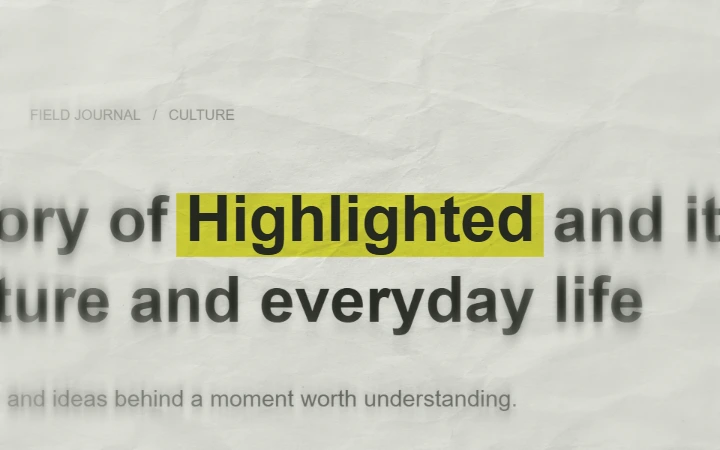
A text match cut connects changing frames through a word that stays in the same place. In a newspaper-style animation, the surrounding print changes while the highlighted phrase remains the visual anchor.
Use the free Text Match Cut generator to make this effect in your browser. It creates designed printed pages around your phrase, so you do not need to align a stack of screenshots manually.
Pick a phrase with a clear job
Start with one word or a short phrase that matters to the next shot. A name can introduce a person; a place can open a travel sequence; a word such as “curiosity” can establish the theme of a video essay. Long sentences are harder to follow as the surrounding page changes.
Build the newspaper highlight effect
Replace the sample text
Open Text Match Cut and enter the phrase you want to highlight. Preview it before adjusting the decoration. Keep the words large enough to read in the final video, particularly on a phone.
Set the paper and typography
Choose your paper and highlight colors, then adjust paper texture and the surrounding print blur. Font variation changes the appearance of the keyword while keeping it aligned. Choose Keep one font if a consistent letter shape is more important than variety.
Find the right pace
Adjust Animation speed while watching the preview. Start with a short sequence and reduce the speed if the first viewing feels difficult to follow. Scrub the timeline to inspect individual changes. Duration determines the length of the clip; changing the pace changes how the motion plays within it.
Export for your timeline
Choose 9:16 for Reels, TikTok or YouTube Shorts, 16:9 for a landscape edit, or 1:1 for a square post. Select 720p or 1080p, then Export video. Keep the tab open while rendering and use Download video when it is ready. MP4 needs browser H.264 support; WebM is the fallback.
Three ways to use the result
- Video essay opener: introduce a key concept, then cut to footage that explains it. Let the narration establish why the word matters.
- Vertical reel hook: place a brief keyword sequence before the main shot. Preview it at phone size and leave room for the platform's interface.
- Chapter transition: repeat the same type and highlight colors between chapters while changing the word. This gives the series a consistent visual cue.
These are editing suggestions, not guaranteed performance recipes. Add your own soundtrack in your video editor and time the cuts against the spoken line or music.
Newspaper, social posts or magazine letters?
Use newspaper text match cuts for a stable keyword surrounded by changing print. Use Social Proof Match Cut or Comment Match Cut for designed post and comment layouts. For letters that form a collage title rather than a fixed-word sequence, choose Magazine Letters.
Designed pages are not news sources
The generated surrounding print and social examples are visual placeholders. They do not retrieve articles or prove that a person or publication said something. For documentary evidence, use accurate quotations and attribution from sources you have permission to show.
Keep the important word readable
If the phrase feels crowded, shorten it or reduce its size. If the changing fonts distract from the message, keep one font and use gentler pacing. Check the downloaded video as well as the live preview, and keep a copy before leaving the page.
The generator is free and adds no watermark. It exports a finished video, not an editable After Effects or CapCut project. See export troubleshooting if rendering fails, or follow the photo-to-paper animation guide to combine the title with a moving cutout.